原文链接:https://zhuanlan.zhihu.com/p/639886110
使用std::variant实现有限状态机
在这篇博文中,我将向你展示如何将“常规”枚举式有限状态机转换为采用C++17里的std::variant的实现版本。
状态
让我们从一个基本示例开始:
- 我们想要追踪游戏里玩家的血量和生命值状况。
- 我们想对“被怪物击中”或“治疗回复”等事件做出回应。
- 当血量变为0时,只有在还有剩余生命的情况下才能重新开始游戏。
这是包含状态和转换的基本图:
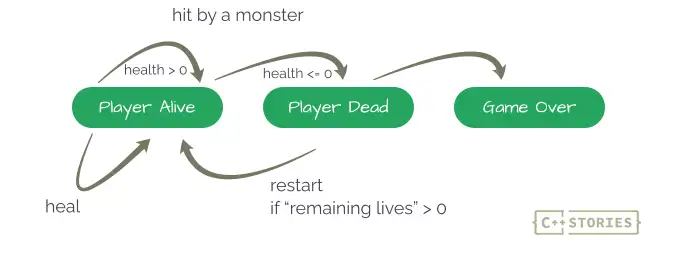
基于枚举的 FSM
我们可以快速编写一些基本代码enum classes:
enum class HealthState { PlayerAlive, PlayerDead, GameOver };
enum class Event { HitByMonster, Heal, Restart };
以及状态机类:
class GameStateMachine {
    public:
        void startGame(unsigned int health, unsigned int lives) {
            state_ = HealthState::PlayerAlive;
            currentHealth_ = health;
            remainingLives_ = lives;
        }

        void processEvent(Event evt, unsigned int param) {
            switch (evt)
            {
            case Event::HitByMonster:
                state_ = onHitByMonster(param);
                break;
            case Event::Heal:
                state_ = onHeal(param);
                break;
            case Event::Restart:
                state_ = onRestart(param);
                break;
            default:
                throw std::logic_error{ "Unsupported state transition" };
                break;
            }
        }

    private:
        HealthState state_;
        unsigned int currentHealth_{ 0 };
        unsigned int remainingLives_{ 0 };
    };
这个实现想法很简单:
- 玩家状态保存在变量
state_中,同时也有两个变量currentHealth_和remainingLives_来跟踪当前血量和剩余生命值。 - 所有关键的逻辑都发生在函数
processEvent中,它需要一个附加参数(通用参数)。
下面是被怪物击中的实现:
HealthState onHitByMonster(unsigned int param) { // param is the force
    if (state_ == HealthState::PlayerAlive) {
        std::cout << std::format("PlayerAlive -> HitByMonster force {}\n", param);
        if (currentHealth_ > param) {
            currentHealth_ -= param;
            return state_;
        }

        if (remainingLives_ > 0) {
            --remainingLives_;
            return HealthState::PlayerDead;
        }

        return HealthState::GameOver;
    }

    throw std::logic_error{ "Unsupported state transition" };
}
正如你所注意到的,param参数现在被视为来自怪物的“攻击力”。该函数首先检查玩家是否还活着,然后根据当前的运行状况,返回相应的状态 Alive 或PlayerDead。如果没有血量,也没有剩余生命时,返回Game Over。
下面,我们还有两个函数:
HealthState onHeal(unsigned int param) {
    if (state_ == HealthState::PlayerAlive) {
        std::cout << std::format("PlayerAlive -> Heal points {}\n", param);

        currentHealth_+= param;
        return state_;
    }
    throw std::logic_error{ "Unsupported state transition" };
}
HealthState onRestart(unsigned int param) {
    if (state_ == HealthState::PlayerDead) {
        std::cout << std::format("PlayerDead -> restart\n");
        currentHealth_ = param;
        return HealthState::PlayerAlive;
    }
    throw std::logic_error{ "Unsupported state transition" };
}
示例代码:
GameStateMachine game;
game.startGame(100, 1);

try {
    game.processEvent(Event::HitByMonster, 30);
    game.reportCurrentState();
    game.processEvent(Event::HitByMonster, 30);
    game.reportCurrentState();
    game.processEvent(Event::HitByMonster, 30);
    game.reportCurrentState();
    game.processEvent(Event::HitByMonster, 30);
    game.reportCurrentState();
    game.processEvent(Event::Restart, 100);
    game.reportCurrentState();
    game.processEvent(Event::HitByMonster, 60);
    game.reportCurrentState();
    game.processEvent(Event::HitByMonster, 50);
    game.reportCurrentState();
    game.processEvent(Event::Restart, 100);
    game.reportCurrentState();
}
catch (std::exception& ex) {
    std::cout << "Exception! " << ex.what() << '\n';
}
输出:
PlayerAlive -> HitByMonster force 30
PlayerAlive 70 remaining lives 1
PlayerAlive -> HitByMonster force 30
PlayerAlive 40 remaining lives 1
PlayerAlive -> HitByMonster force 30
PlayerAlive 10 remaining lives 1
PlayerAlive -> HitByMonster force 30
PlayerDead, remaining lives 0
PlayerDead -> restart
PlayerAlive 100 remaining lives 0
PlayerAlive -> HitByMonster force 60
PlayerAlive 40 remaining lives 0
PlayerAlive -> HitByMonster force 50
GameOver
Exception! Unsupported state transition
这里我们将初始血量设置为100,并附加1个生命值。正如您所看到的,它在第一次“死亡”后正确地重新创建了游戏。
该方法的优点和缺点
如您所见,代码有效,而且看起来很简单。简单性是这种实现的最重要的一点。它也非常通用,您可以使用枚举和 switch 指令在其他编程语言编写类似的代码。
但…
我们可以注意到几个缺点:
- 当有更多的状态和交互时,它可能会变得复杂。
- 我们需要针对不同情况下“解释”其通用“参数”,因此它不具有可扩展性和可读性。
- 有一些代码重复,例如,检测不支持的状态转换。
- 状态非常简单,不包含任何额外的“状态”或者值,因此我们必须保留附加数据作为状态机的成员。
- 同样,事件也很简单,无法将更多数据传递给事件处理程序。
基于std::variant的状态机
该如何采用std::variant实现一个状态机呢?
主要思想是std::variant是一种混合类型并支持值语义。因此它的使用也相对简单,并且不需要使用指针、虚方法等来实现 FSM。
让我们尝试一下这种方法,现在,我们可以将更多数据放入状态和事件中,而不是依赖枚举。
namespace state {
    struct PlayerAlive {
        unsigned int health_{ 0 };
        unsigned int remainingLives_{ 0 };
    };
    struct PlayerDead {
        unsigned int remainingLives_{ 0 };
    };
    struct GameOver { };
}

using HealthState = std::variant<state::PlayerAlive, state::PlayerDead, state::GameOver>;

namespace event {
    struct HitByMonster { unsigned int forcePoints_{ 0 }; };
    struct Heal { unsigned int points_{ 0 }; };
    struct Restart { unsigned int startHealth_{ 0 }; };
}

using PossibleEvent = variant<event::HitByMonster, event::Heal, event::Restart>;
为了处理事件,我们可以实现几个函数:
HealthState onEvent(const state::PlayerAlive& alive,
                    const event::HitByMonster& monster) {
    cout << format("PlayerAlive -> HitByMonster force {}\n", monster.forcePoints_);
    if (alive.health_ > monster.forcePoints_)
    {
        return state::PlayerAlive{
                 alive.health_ - monster.forcePoints_, alive.remainingLives_
                 };
    }

    if (alive.remainingLives_ > 0)
        return state::PlayerDead{ alive.remainingLives_ - 1 };

    return state::GameOver{};
}
Healing:
HealthState onEvent(state::PlayerAlive alive, const event::Heal& healingBonus) {
    std::cout << std::format("PlayerAlive -> Heal points {}\n", healingBonus.points_);

        alive.health_ += healingBonus.points_;
        return alive;
    }
Restart:
HealthState onEvent(const state::PlayerDead& dead, const event::Restart& restart) {
    std::cout << std::format("PlayerDead -> restart\n");

    return state::PlayerAlive{ restart.startHealth_, dead.remainingLives_ };
}
Game over:
HealthState onEvent(const state::GameOver& over, const event::Restart& restart) {
    std::cout << std::format("GameOver -> restart\n");

    std::cout << "Game Over, please restart the whole game!\n";

    return over;
}
最后,我们可以为未知状态转换实现一个函数:
HealthState onEvent(const auto&, const auto&) {
    throw std::logic_error{ "Unsupported state transition" };
}
我们已经实现了所有事件,正如你所看到的,代码更具可读性。由于状态和事件包含附加数据,因此我们现在可以使用正确命名的参数,而不是依赖“通用”param变量。
状态和事件现在是独立的,不依赖于状态机中存储的附加数据。
状态机类
让我们尝试将这些部分连接在一起:
class GameStateMachine {
    public:
        void startGame(unsigned int health, unsigned int lives) {
            state_ = state::PlayerAlive{ health, lives };
        }

        void processEvent(const PossibleEvent& event) {
            state_ = std::visit(detail::overload{
               [](const auto& state, const auto& evt) {
                   return onEvent(state, evt);
               }
            },
            state_, event);
        }

    private:
        HealthState state_;
    };
哇,现在超级简单了!
由于我们将事件和状态存储在独立的variant中,因此我们使用std::visit来访问多个variant。之后我们采用一个overload对象便实现了通用事件处理程序。
我们还可以在overload内部实现转换,而不是在onEvent函数中:
state_ = std::visit(detail::overload{
 [](const state::PlayerAlive& alive, const event::HitByMonster& monster) {
   /* on monster */
 },
 [](state::PlayerAlive alive, const event::Heal& healingBonus) {
   /* on heal */
 },
 [](const state::PlayerDead& dead, const event::Restart& restart) {
   /* on restart */
 },
 [](const state::GameOver& over, const event::Restart& restart) {
   /* on restart in game over... */
 },
 [](const auto& state, const auto& evt) {
    /* unsupported */
  }
},
state_, event);
该代码也可以工作,但当每个转换包含多行代码时可能会变得复杂。
这是演示:
GameStateMachine game;
game.startGame(100, 1);

try {
    game.processEvent(event::HitByMonster {30});
    game.reportCurrentState();
    game.processEvent(event::HitByMonster {30});
    game.reportCurrentState();
    game.processEvent(event::HitByMonster {30});
    game.reportCurrentState();
    game.processEvent(event::HitByMonster {30});
    game.reportCurrentState();
    game.processEvent(event::Restart {100});
    game.reportCurrentState();
    game.processEvent(event::HitByMonster {60});
    game.reportCurrentState();
    game.processEvent(event::HitByMonster {50});
    game.reportCurrentState();
    game.processEvent(event::Restart {100});
    game.reportCurrentState();

}
catch (std::exception& ex) {
    std::cout << "Exception! " << ex.what() << '\n';
}
输出:
PlayerAlive -> HitByMonster force 30
PlayerAlive 70 remaining lives 1
PlayerAlive -> HitByMonster force 30
PlayerAlive 40 remaining lives 1
PlayerAlive -> HitByMonster force 30
PlayerAlive 10 remaining lives 1
PlayerAlive -> HitByMonster force 30
PlayerDead, remaining lives 0
PlayerDead -> restart
PlayerAlive 100 remaining lives 0
PlayerAlive -> HitByMonster force 60
PlayerAlive 40 remaining lives 0
PlayerAlive -> HitByMonster force 50
GameOver
GameOver -> restart
Game Over, please restart the whole game!
GameOver
扩展
我们也可以将Event作为模板参数来实现:
template <typename Event>
void processEvent(const Event& event) {
    state_ = std::visit(detail::overload{
        [&](const auto& state) {
              return onEvent(state, event);
        }
    },
    state_);
}
这样我们可以采取任何类型的事件,甚至不相关的类型,然后再将它作为常规函数参数传递。
您可以在以下链接中阅读有关此技术的更多内容:How To Use std::visit With Multiple Variants and Parameters - C++ Stories
有什么缺点吗
在我看来,该解决方案variant看起来很棒。
但关于缺点,我必须提到每个variant的大小都是它存储的最大类型的大小。
在 MSVC 上,我得到:
sizeof(HealthState):   12
sizeof(PossibleEvent): 8
虽然不多,但你可能会考虑这些事件和状态中应该保留什么状态以及如何有效地传递它们。这对于简单状态机并不重要,但对于关键系统,您可能会看到一些开销。
在另一篇文章中查看这个可能的解决方案:Space Game: A std::variant-Based State Machine by Example - C++ Stories
总结
在本文中,我向你展示了一种很酷的采用std::variant实现的有限状态机技术。使用该类型,我们仍然可以使用值语义,并且我们的状态和事件可以包含更多数据并将其传输到整个系统。这使我们能够更好地封装代码并使其更易于推理。
文章的代码可以在我的Github上找到:
github.com/fenbf/articles/cpp20/stateMachine/stateMachine.cpp
参考
https://www.cppstories.com/2023/finite-state-machines-variant-cpp/